Skip to content
Outcomes, measured

Measure what people do. Not what they completed.

Cyberdise rates each person on what they did when tested: the links they clicked, the data they entered, the trainings they did not pass. When someone reports a suspicious message, it reaches your security team as a case.

Reported to case
automatically grouped
AI analysis
scored on arrival
SOAR connected
into your own tooling
Per person and team
rolls up and drills down
A chief information security officer holding a single sheet
Observed, not self reported

Completion tells you a course was consumed. Behavior tells you whether it worked.

Each person gets a risk rating from 0 to 100, built from what they did in simulations and training. Higher means riskier, and every report they make is recorded beside it.

What most programs measureCompletion metrics
What Cyberdise measuresBehavioral scoring
A course was assigned and finished.

Tells you the content was delivered. Not what happens to the next suspicious message.

What happened to the message.

Clicked, data entered, file opened or reported. Each is recorded per person and per campaign.

Self reported confidence.

People rate themselves, and the rating and the behavior often disagree.

Observed action.

Clicks, submitted data, opened files and reports. Nobody grades themselves.

One number for everyone.

No way to see which department or role carries the exposure.

Per person and per group.

The same score rolls up for the board and drills down for the operator.
You define a failureEach campaign's success definition decides whether a click, a submitted form or an opened file counts as failed.
Group ratingsA group's rating is the average of its members and updates whenever one of theirs changes.
Five risk levelsLow to Critical by default, and a level applies only once enough simulations and trainings back it up.
People see their ownEach person can follow their own rating history, phished rate and reported rate in the User Portal.
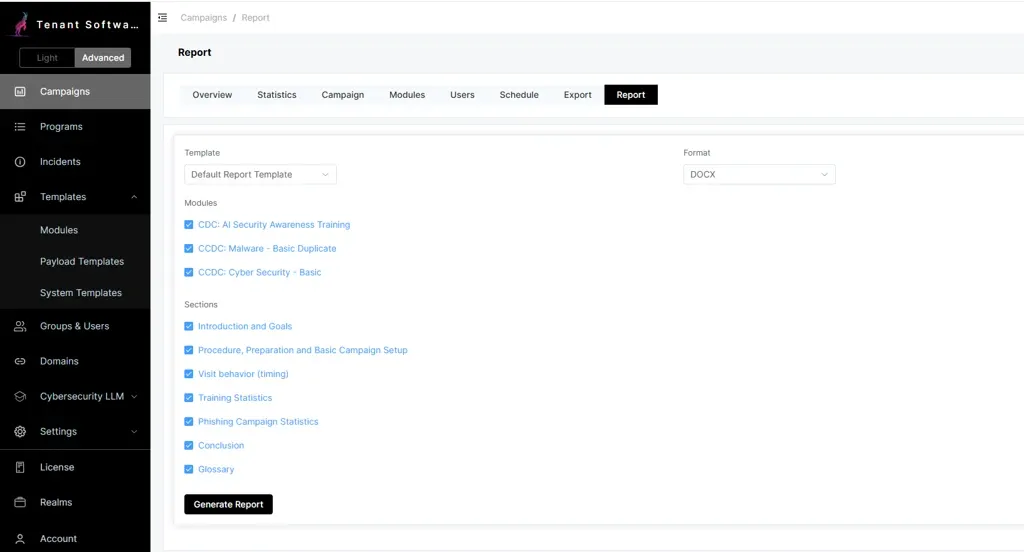
The Report tab of a campaign, with a template and format chosen, modules and report sections ticked, and a Generate Report button
For the board

Your board report, generated from the campaign.

Pick a campaign, choose a template, the modules and the sections, and generate. The template holds your wording, your logo and your structure. Variables fill in the counts and percentages, so every figure comes from the campaign and none from a spreadsheet. Keep one template for the CISO, another for the risk officer and a third for the auditors.

  • A default template in every realm, ready to use or duplicate
  • Sections for goals, setup, visit timing, training and phishing results, and a conclusion
  • Word or PDF output, with the same data on the dashboard, in CSV exports and through the API
  • One layout can serve several realms
The evidence

Behavior moved. Attitude moved separately.

The distinction matters for what you measure: training shifted how people think, exposure shifted what they did.

~60%less risky clicking after AI spearphishing exercises
12.1%click rate after normative training, down from 21.3% and 25.5% in the two baseline rounds
p = 0.03significance of the AI spearphishing click result, between groups

Source: AISP study

A reported message becomes a security case.

Reported messages are analyzed inside Cyberdise or passed to the tooling you already run, and your team works them as cases. Repeat reports of the same attack merge into one incident instead of arriving as fifty separate tickets. When the reported message was one of your own exercises, it is labeled as a simulation rather than opened as a threat.

  • Cases in one incident dashboard, reviewed by realm or tenant operators
  • Case automations that call your own tools through the API
  • Reports counted per person in the campaign statistics
  • Incident figures ready to drop into the campaign report
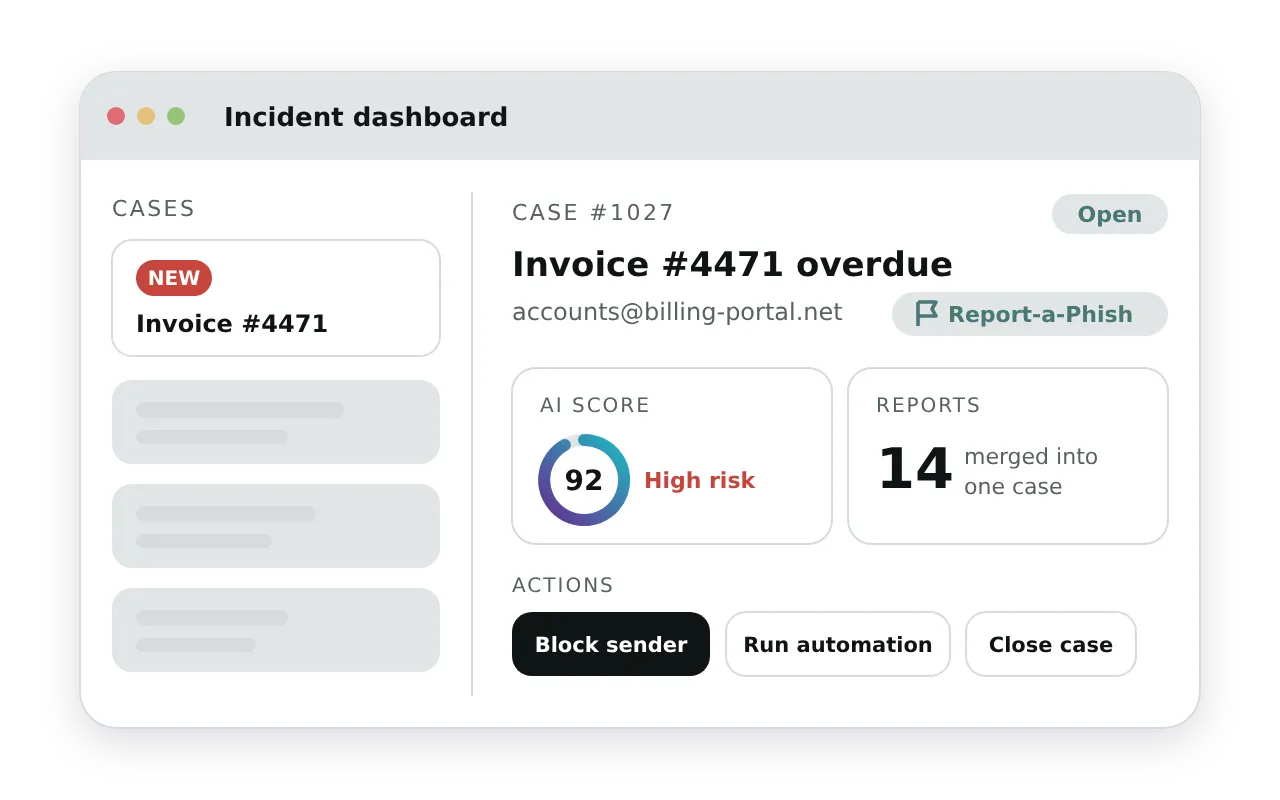
An incident dashboard where a reported message arrives as a new, open security case, with an AI score of 92, fourteen reports merged into one case and actions to block the sender, run an automation or close the case
The rest of the platform

Where the signals come from, and what they start.

Report-a-Phish ButtonReporting in one click from Outlook, Exchange or Gmail.Report-a-Phish Button
Phishing and smishingMultichannel exercises built from the tactics attackers are using now.Phishing and smishing
AI Campaign AutomatorDescribe the campaign you need and get a running program.AI Campaign Automator
A security analyst turning from his screen to talk to a colleague holding a printed case note

You choose which steps run on their own.

When thresholds are met the workflow escalates: open a case, pass data into SOAR, block a sender, remove the message from inboxes, or hand enriched context downstream. You automate only the steps you choose to automate. Because repeat reports merge into one case and thresholds are set per realm, a real attack gives your analysts one case to work rather than a queue of duplicates.

  • Reported messages forwarded to your SOAR environment or sandbox
  • A REST API with full access to the platform, documented in OpenAPI
  • Token access limited to the realms each operator can see
  • Thresholds configurable per realm

Where the reports come from

How is the risk rating calculated?
It is the share of simulations and trainings a person failed, on a scale from 0 to 100, so two failures out of ten make a rating of 20. You decide what counts as a failure in each campaign, and you can rename or retune the five levels, from Low to Critical.
Does reporting a message improve someone's rating?
Every report is tracked per person and per campaign, and shows up in the statistics and the campaign report. A reported exercise also counts as one they did not fall for.
Who can see individual results?
The operators of a realm see the results in that realm, and tenant operators see across their realms. Management or works council members can get a read only account that shows the data but cannot change it. Each employee sees their own results in the User Portal. If individual results should not be visible at all, run the campaign in Anonymous Mode.
Can we run campaigns anonymously for the works council?
Yes. When you create a campaign, switch on Anonymous Mode and pick the fields to hide, such as name, email, phone, group, IP address or browser. Hidden fields show as *** in the statistics, the schedule, exports and reports, and the data itself comes back masked, so the values are hidden in the data as well as on screen. The choice is locked once the campaign is saved, so nobody can switch it off later. A works council member with a read only account can check this directly.
What personal data does a simulation collect?
Only what the exercise needs: the interaction itself and technical data such as time and browser. What people type into a phishing form is stored only if you switch that on. Cyberdise processes the data as your processor under a data processing agreement. Hosting and data location are on the platform page.
What happens to someone's results when they leave?
They stay. A person who drops out of your directory or user groups is archived, not deleted, so past campaigns still add up and an incident can be traced months later. If they come back, their history comes back with them. When a retention policy requires it, you delete archived users by hand, or automatically after a period you set per realm. Name, email and phone are then replaced by an ID, and the statistics stay attached to that ID, so your totals do not change.

See your own numbers before you commit to anything.

We show you where the score comes from and what your board report would look like.